


Phantombuster – Notice & Presentation
Phantombuster was created in 2016 and consists of more than 130 automation tools to help companies hack their sales and marketing processes. These tools also facilitate the extraction of valuable data from various online platforms such as Twitter, Facebook, LinkedIn, Instagram and other online platforms.
Phantombuster is a marketing tool for the inexperienced, it allows, as we will see to extract data and automate actions on social networks for example. In this article we present our review of Phantombuster and explore its features.
Who uses Phantombuster?
The tool was founded by Martin Tapia and Guillaume Boiret, who aimed to create the ultimate solution for growth-hackers and marketers. It proves invaluable for marketing professionals seeking to navigate the digital landscape through effective automation.
Activities that can be automated with tools include data collection, storage and automatic formatting.
According to BAMF, a marketing specialist, Phantombuster stands out from other growth tools simply because it is the only one that can meet all the expectations of professionals in the field.
Exploring the Key Features of Phantombuster
Phantoms
The principle of Phantombuster is to propose an API (Application Programming Interface) allowing communication between several interfaces. Phantombuster offers many APIs adapted to many applications (LinkedIn, Instagram, Facebook, email, YouTube, GitHub…).
These APIs, often referred to as “phantoms,” enable users to extract valuable data like email addresses, geographic locations, and other essential information. (Here is a representation of the phantoms for LinkedIn)
Creating Seamless Data Flows
Another standout feature of Phantombuster is its ability to create efficient data flows. The platform ensures that all connected interfaces operate in the cloud. For example, it integrates with Google Sheets, where users can link to their Phantombuster account, allowing data files to transfer automatically.
Phantombuster extension
To make growth hacking accessible to non-technicians, the extension removes the complexity involved in manually entering session cookies.
This extension automatically retrieves session cookies from the websites you are logged into. Once you are in Phantombuster, simply click on “Log in to site” to fill out the session cookie entry field.
If you click with the Shift key on the “Log in to site” button, a new tab will open on this site even if you are already logged in without logging out. This allows you to receive cookies from multiple accounts at the same time.
Simplify Your Prospecting Process via LinkedIn Automation
1: Build Targeted Lead Lists on LinkedIn
- Export profiles of your LinkedIn connections as the first step in any workflow. Find LinkedIn profiles from a list of full names
- Collect up to 2,500 members from a LinkedIn group. You can extract posts and other activities from a list of LinkedIn profiles. This LinkedIn automation connects to LinkedIn on your behalf, navigates through the groups you entered and scrolls through the list of members by exporting each member’s data into a spreadsheet ready for download. These results will be collected automatically.
- Collect attendees of a LinkedIn event you attend
- Export message threads and the people who are sending them from your LinkedIn inbox as a first step in any workflow.
- Write down all the data available in LinkedIn job offers.
- Write down all the data available in LinkedIn recruiter profiles, including emails, in Beta.
- Retrieve a list of employees from a company.
- Get a list of employees from the Sales Navigator.
- Extract businesses from the LinkedIn search.
2: Enriching Your Prospecting Files
You can enrich the data contained in your lead files by extracting data from LinkedIn:
- Turn LinkedIn into your database and download any list of search results, whether it’s prospect profiles, businesses, jobs, schools, etc. This LinkedIn automation will help you:
→ Export any LinkedIn search and get the results in a CSV file.
→ Add daily to your list of prospects, whether they are individuals or companies, by setting the Phantom on repeat. - Build your LinkedIn automation strategy from the profiles you’ve pulled, by fetching data, sending login requests, messages, or whatever you need.
- Retrieve the job email from the Sales Navigator search list.
- Collect emails from members of LinkedIn groups.
- Retrieve business emails from people who commented on a post.
- Find professional emails using the names of people and companies.
- Retrieve business emails from your LinkedIn connections.
- Finally, you can directly supplement your CRM with your new LinkedIn connections.
3 Growth Hacking Tool to Automate Actions on LinkedIn
- Connect to all leads in the Sales Navigator search.
- Automatically likes all publications from your company and colleagues.
- Log in to all LinkedIn search profiles.
- Connect with all members of a group.
- Send invitations or messages to people who have viewed your Sales Navigator profile.
- Follow the mentions of your favorite brands.
- Automatically send welcome messages to all your new connections.
- Automatically send invitations to your LinkedIn events to all of your contacts.
- Invite your contacts to follow your company page.
- Follow the mentions of your favorite brands.
- Send an invitation to everyone who liked a publication.
- Send invitations or messages to anyone who has commented on a publication.
- Also, use workflows to facilitate your work.
Phantombuster’s new Growth hacking feature is the ability to automate your LinkedIn connections and grow your network with new professionals seamlessly every day:
- This LinkedIn automation will help you get LinkedIn profiles from search or LinkedIn/Sales Navigator groups
- Send login requests with custom messages
- Check the acceptance rate of your connection requests
All this will happen in continuous flow through the Cloud. This means you don’t need to have your browser open or your computer turned on for it to work. You will get your results on autopilot!
How to Automate Your Prospecting with LinkedIn?
1: Using Phantombuster for Instagram Scraping
- To prospect on Instagram, there are several ways to create lead lists and target your audience on Instagram from Phantombuster:
- Find Instagram profiles from a list of full names or company names.
- Automatically watch the Instagram stories on your feed or from a list of profiles. Start appearing in thousands of stories of your target audience every day, creating an interaction with them. Watching the Instagram Stories automatically will help you get noticed by your target audience and these interactions will then allow you to retarget advertising campaigns on those people.
- Export notifications for community insight by taking the initiative to extract notifications from users who have followed you. This initial step can deepen your connection with your community, allowing you to understand who is engaging with your content.
- Phantombuster helps you to engage with personalized messaging by enabling the ability to send messages through another Bot.
- Find current stories from a list of Instagram accounts. This information is useful if you want to collect data about your audience: Who are they? How much are they invested in? Start answering these questions by setting up this automated Instagram tool now.
2: Use Phantombuster to Enrich Prospecting Files
- Get users who have viewed your current Instagram stories.
- Retrieve tagged posts from a list of Instagram accounts. This Instagram scraper will be useful if you are trying to build a targeted audience that has been active towards a really specific topic.
- Collect all available data from a list of Instagram posts.
- Get users who commented on an Instagram post.
- Find Instagram profiles from a list of full names or company names.
New Capabilities with Phantombuster for Instagram
Hashtag Flexibility: When searching for posts associated with multiple hashtags, Phantombuster provides the ability to extract content linked to several hashtags simultaneously, overcoming the limitation of one hashtag per search.
Followed Profiles Collection: You can now easily gather profiles that any selected Instagram account is following.
Once your data collection is completed, you can employ additional Phantombuster functionalities such as auto-liking specific accounts or retrieving email addresses connected to the profiles you’ve gathered.
3: Master Phantombuster to Automate Instagram Actions
There are many ways to automate your Instagram on Phantombuster, but be careful not to abuse these features on Phantombuster at the risk of being banned from Instagram. Indeed, unlike Inflact, Phantombuster does not take Instagram’s hourly limits into account. For instance, depending on how long you’ve had your account, liking more than 300 photos within a certain time frame can lead to issues.
Phantombuster offers a whole range of features to automate your Instagram:
- You can self-comment a list of posts on Instagram. Indeed, after having previously filled a list of comments in an Excel or Google Sheet file, Phantombuster will pick from this list to automatically start your posts.
- It is also possible to auto-follow a given list of profiles.
- You can also auto-like a list of Instagram posts.
How to Use Google Maps Information with Phantombuster?
Thanks to Phantom Buster and Google Maps, you will be able to scrape email addresses to do your bot prospecting or get contacts in general (names of companies, phone numbers, links to their social networks, and their websites). Thus, you can acquire between 200 and 300 business cards.
We will therefore present to you how to acquire qualified leads with two tools, namely Google Maps and Phantombuster:
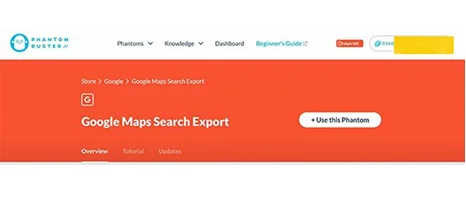
1 Locate the Google Maps Search Export Phantom by searching the feature within Phantombuster
2 Enter the link of a blank Google Sheet file in the search bar. To find your Google Sheet link, simply open a Google Sheet file and share your Google Sheet file with the green button.
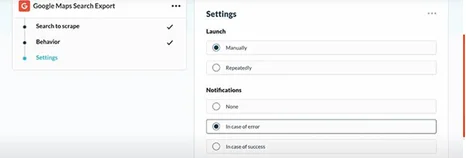
3 Choose these settings:
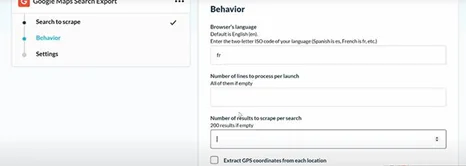
4 Select the language of your search engine as well as the number of searches to be scraped.
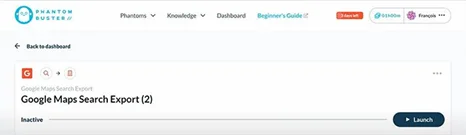
5 Press “Launch” to start the process.
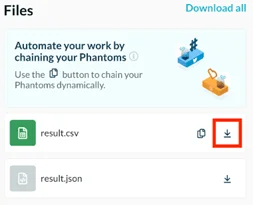
6 Download the collected data. Retrieve only the column with the list of restaurants’ websites, and copy this column into a new Google Sheet. Copy the link into Google Sheet in shared mode and keep this link.
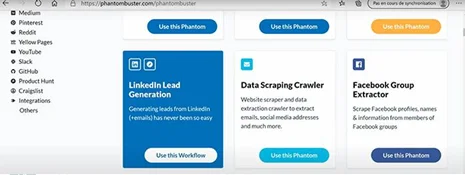
7 Navigate to the main page of Phantombuster and look for the module «Data Scraping Crawler».
8 Once in the Data Scrapper module, copy your Google Sheet link to the first tab.
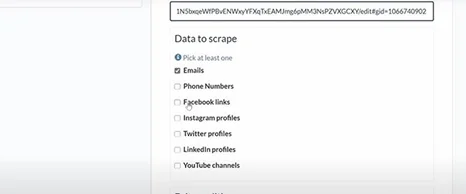
Then choose the information you want to get like Emails, phone number or facebook links as in the image below. Then, in the other Setting tab you don’t need to change the settings.
9 Start the process as with the other phantom and wait a few minutes and your data is recovered.
Phantombuster Pricing Plans and Features
- Free Plan: The trial plan is an excellent entry point. With instant access for 14 days and no credit card required, users can dive into the platform without financial commitment. The trial includes a generous 2 hours of execution time, 1,000 AI credits, and 5 slots for managing Phantoms.
- Affordable Start: The Starter plan provides a more robust setup for just $69 per month. This plan is designed for users ready to take their automation efforts to the next level. With 20 hours of execution time each month and 10,000 AI credits, it allows for enhanced productivity. Users can access 5 Phantoms and unlimited exports.
- Accelerate with the Pro Plan: The Pro plan is a strong choice at $159 per month. This option features an impressive 80 hours of execution time per month and 30,000 AI credits, allowing for substantial growth automation. It offers 15 slots for Phantoms and, like the Starter plan, provides unlimited exports and community access.
- Empower your Team: Businesses looking to enhance collaboration and efficiency within their teams will find the Team plan ideal at $439 per month. This comprehensive package boasts an extensive 300 hours of execution time and a whopping 90,000 AI credits. With 50 slots for Phantoms and unlimited exports, teams can work concurrently on various automation projects. Like the Pro plan, it includes community access and priority support, making it a perfect fit for organizations looking to optimize their growth strategies
The Pros and Cons of Phantombuster
Phantombuster is a well-suited solution for medium complexity processes. If you are looking to set up simple processes, which have a vocation to evolve quite a lot, it is a super compromise.
- Quick Leads: We liked the possibility of getting these leads quickly, thanks to the APIs available on the site, here is the method in this video.
- The automation of actions on Instagram: We liked the variety of features available to automate your Instagram or LinkedIn account, even if the limitations of the Instagram charter are not taken into account.
- The beginnings of the platform: The beginnings can be difficult, with interfaces and explanations not always clear.
- Customer support: The customer support responds fairly quickly; however, it does not really help you when you have a problem, even if the customer support is improving.
Final Opinion: Customer Reviews + Alternatives of Phantombuster
In terms of efficiency, Phantombuster stands out from other platforms, even those that are more complex. Initially, it can be challenging to navigate due to the lack of clear guidance. Many users find that watching instructional videos or reading articles is beneficial for discovering the platform’s full potential.
In reality, the main strength of Phantombuster is that it offers a lot of features that you can’t find anywhere else. In addition, its continuous-stream cloud solution that allows bots to run without having to open your computer is also particularly powerful.
There are, however, a few potential drawbacks as well. For instance, users face the risk of being banned from Instagram if they fail to adhere to the platform’s rules. Unlike competitors, Phantombuster does not incorporate the limitations and regulations set by individual platforms. Alternatives like Inflact.com, which actively monitor Instagram’s ever-changing guidelines, serve as a safer choice for users worried about compliance.
Other alternatives, such as Instaboss, offer a more user-friendly experience and allow for the management of multiple Instagram accounts simultaneously, much like Combin and Jarvee.